Spondo Billing
Spondo Billing is billing for AI products. It records what your product does for each customer and what that costs you, prices it with plans and credits, bills through Stripe, and shows each customer the value they got.
What you get
A dashboard that puts what each customer pays you next to what they cost you to serve. These screenshots are from the live demo: a company selling two AI products, DocuMind and CallPilot, to 14 customers. Open it and look around; there's nothing to sign up for.
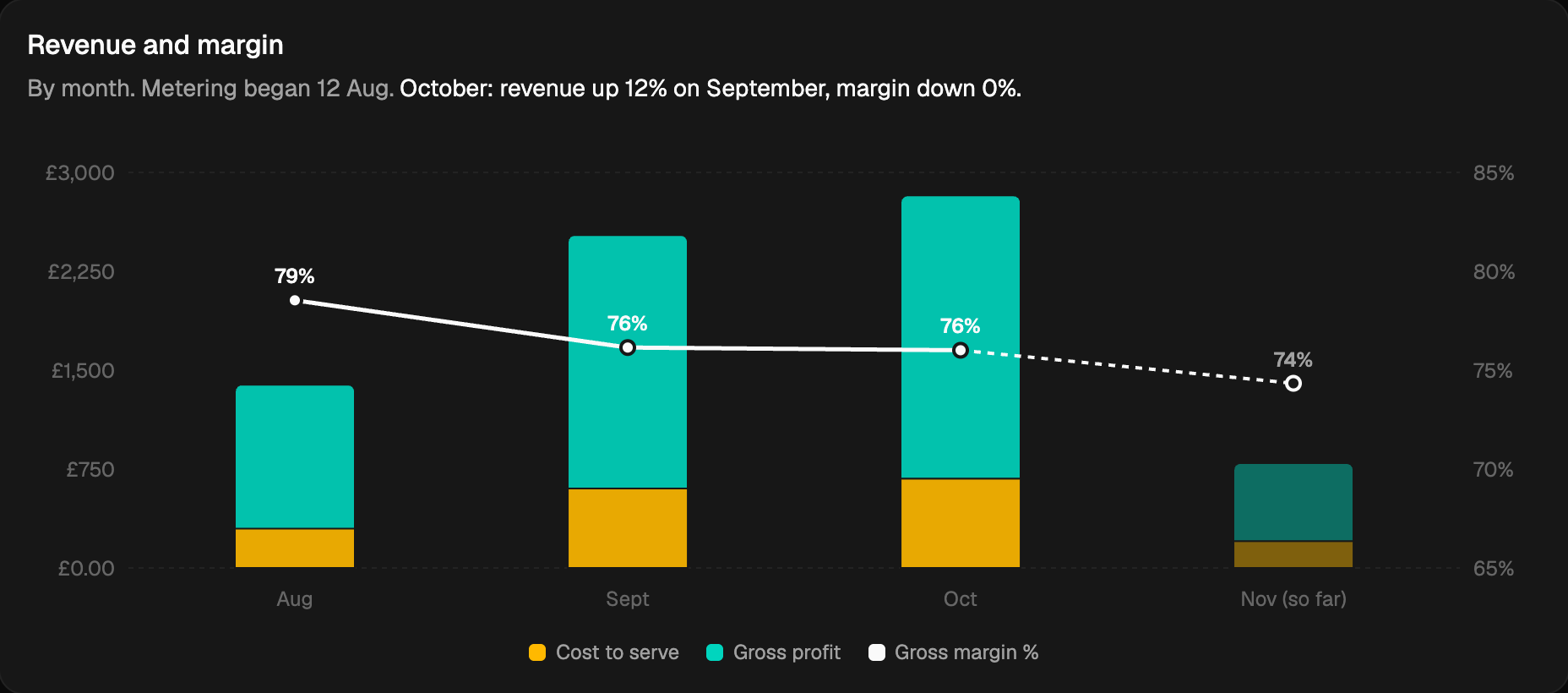
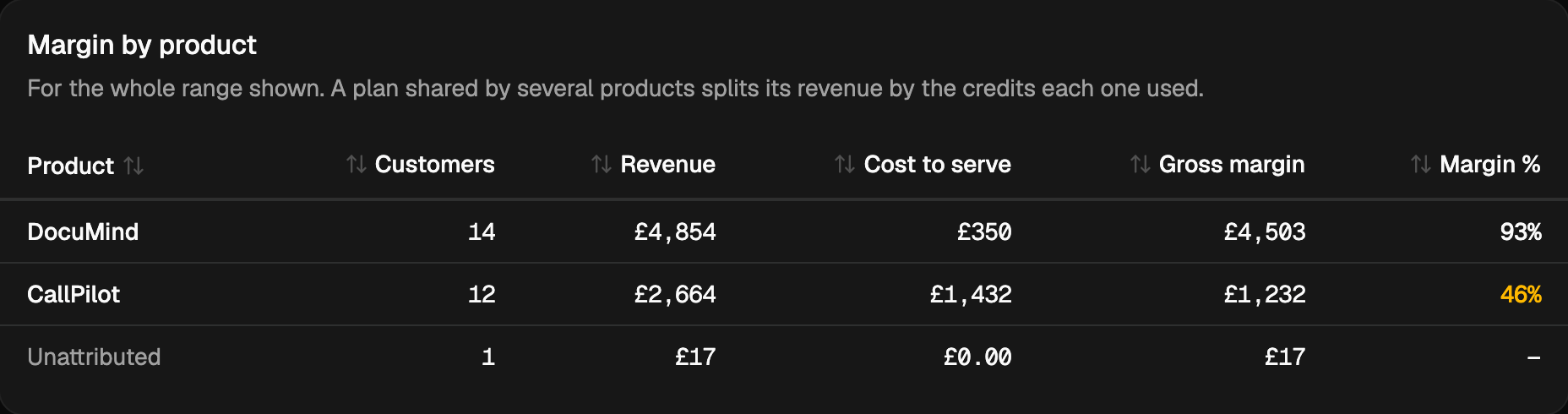
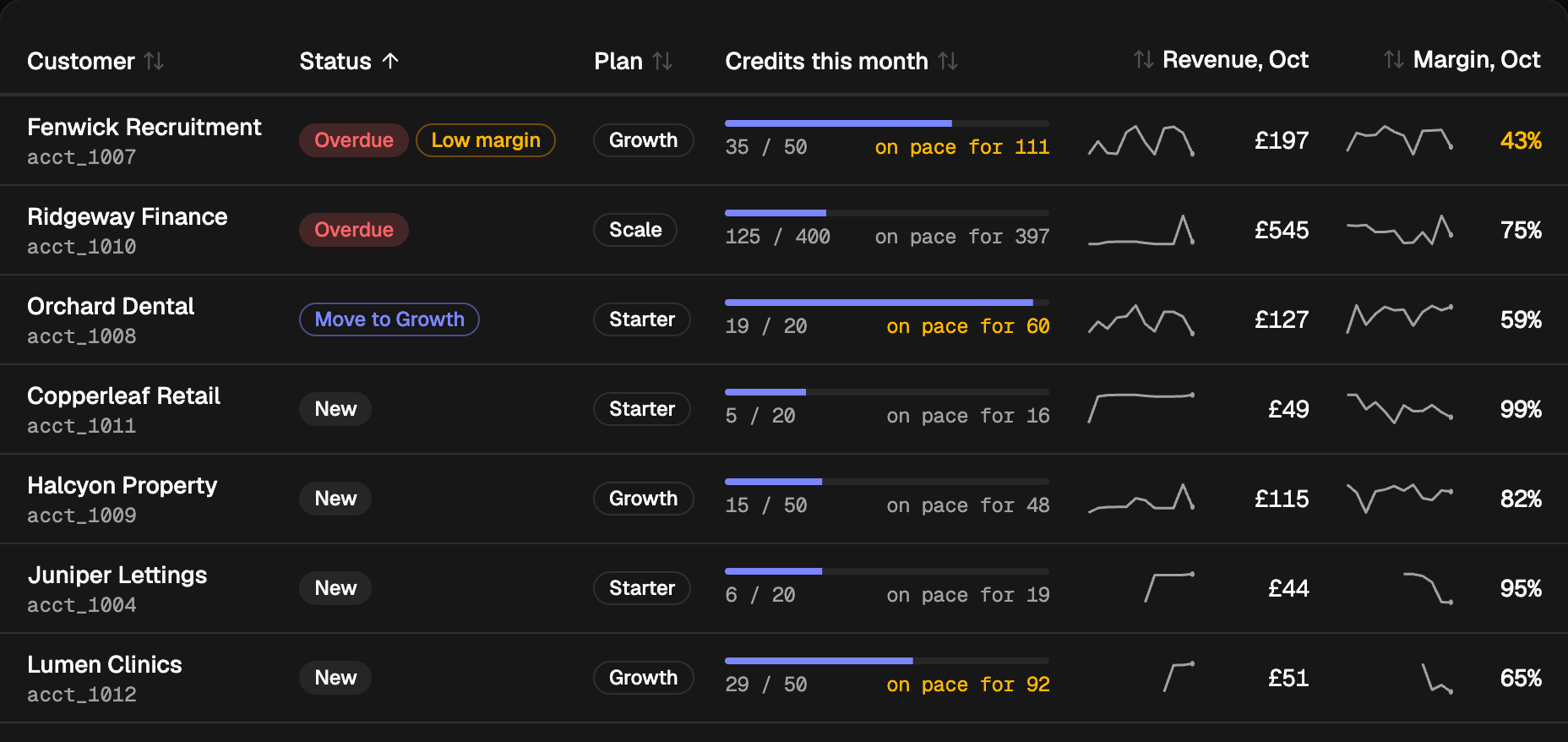
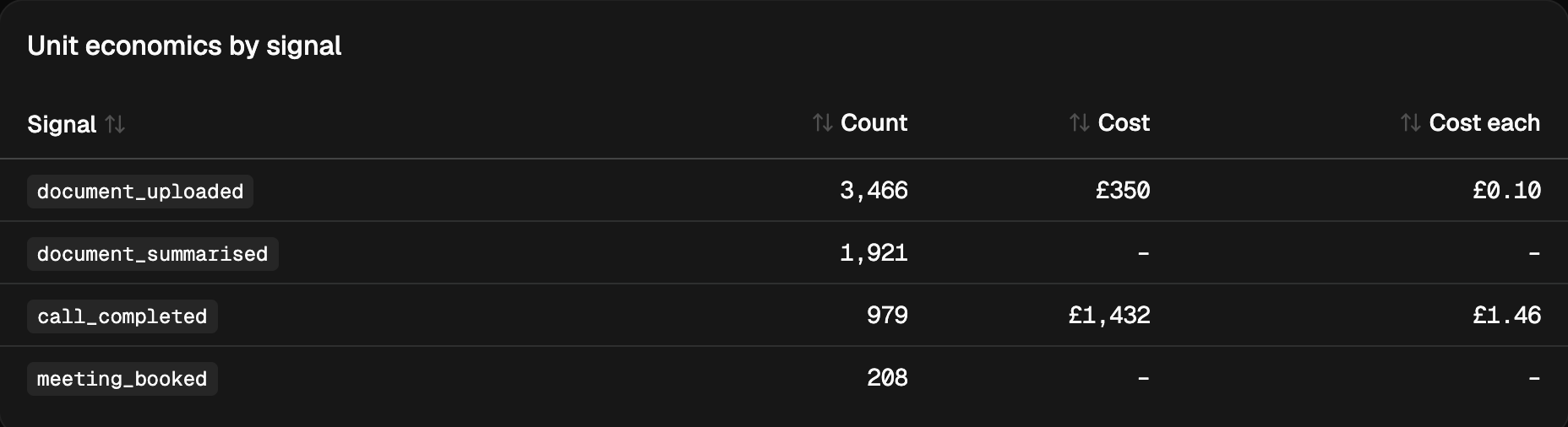
The Quickstart puts your first customer's cost on screen in about ten minutes.
How it fits together
You send two streams of data from your product:
- Signals: one event each time your product does something a customer pays for or values, such as
document_uploadedorcontract_reviewed. - Cost traces: OpenTelemetry traces of your LLM calls, which Spondo Billing prices from their tokens.
Everything else is built on those: what each customer owes, what they cost you, your margin, and the value you delivered.
| Concept | What it is |
|---|---|
| Customer | A business you sell to. You give each one your own ID, its external ID, and use it everywhere instead of storing Spondo Billing's IDs. |
| Signal | One thing your product did for a customer: an event name, the customer, optionally the product, and any numbers in data, such as { "pages": 12 }. |
| Cost trace | An LLM call your product made, with its model and token counts. Spondo Billing prices it and puts the cost on the customer, and on the signal it produced. |
| Product | Something you sell, such as DocuMind. Signals and costs can be attributed to a product, so you see margin per product. |
| Plan | How a customer is charged: a fee, included credits, the price of extra credits and charges priced from signals. |
| Credits | A balance a customer spends as they use your product. Plans say how many credits each signal costs; grants and purchases add credits. |
| Order | A customer's subscription to a plan: what they bought, from when, at what price. A checkout creates one when the customer pays. |
| Invoice | What a customer owes for a period. With Stripe connected, Stripe collects payment and invoices sync back. |
| Value | What your product's work was worth to the customer, from agreed value per signal. A value receipt shows them "You paid $203. We delivered $3,823 of value." |
A typical integration
- Create customers as they sign up, with your own ID as
externalId. - Send a signal each time your product does billable work, with that ID.
- Trace your LLM calls, tagged with the same customer ID.
- Set up products and plans in the dashboard or through the API.
- Take payment with a checkout link, and let Stripe invoice.
- Listen for webhooks to keep your product in step: an invoice paid, a payment failed, credits running low.
The Quickstart does steps 1 to 3 in about ten minutes.
Customers and external IDs
You don't need to store Spondo Billing's IDs. Every customer, product and plan takes an externalId: your own ID for it, such as your account ID. Use it wherever the API asks for a record:
- In request bodies, as
externalCustomerIdorexternalProductIdinstead ofcustomerIdorproductId. - In paths, through each operation's
/external/{externalId}twin:GET /customers/external/acme-legalinstead ofGET /customers/cus_Q2x9vB7mK4pT1sLw.
Customer external IDs are matched without regard to case. A customer can also have aliases, other IDs it is known by (from another system, say), which signals and traces can use too.
Ways in
| Use it for | |
|---|---|
| REST API | Everything: https://billing.getspondo.com/api/v1, with an API key from the dashboard. |
| Node client | The same API from Node, Bun, Deno or the edge, with typed methods: npm install @spondo/billing. |
| OpenTelemetry | Cost traces from any language, at https://billing.getspondo.com/v1/traces. |
| Webhooks | Events from Spondo Billing to your server. |
| Dashboard | API keys, plans, Stripe, and seeing it all: revenue, cost, margin and value by customer. |